Receipts,issued by your customers.
Maru Invoice is a Shopify app for estimates, plus invoices, delivery notes, and receipts that meet Japan's invoice rules. Customers download them from their order history with their own billing name.
Free plan available · customer self-service on Basic (free for 7 days)
- On the Shopify App Store
- Japan's invoice rules
- E-bookkeeping search requirements
- Made in Japan, Japanese support
Common Challenges
Endless receipt requests
You ask each customer for a billing name and purpose, make the receipt by hand and send it. If they want a different name, you make it again. It eats into your real work.
No Japanese invoices in Shopify
Shopify has no built-in invoice or receipt feature for Japanese business customs. Are you re-entering registration numbers and tax by rate in Excel or other tools every month?
Retyping for accounting and shipping
Order amounts into your accounting software, addresses into shipping labels, one by one. Are you typing the same numbers again every month-end?
No month-end billing for businesses
Shopify assumes one payment per order, so month-end billing for business customers does not work out of the box. Are you gathering orders per customer and making invoices by hand?
Maru Invoice solves all of these
Customer Self-Service
Stop handling receiptrequests one by one
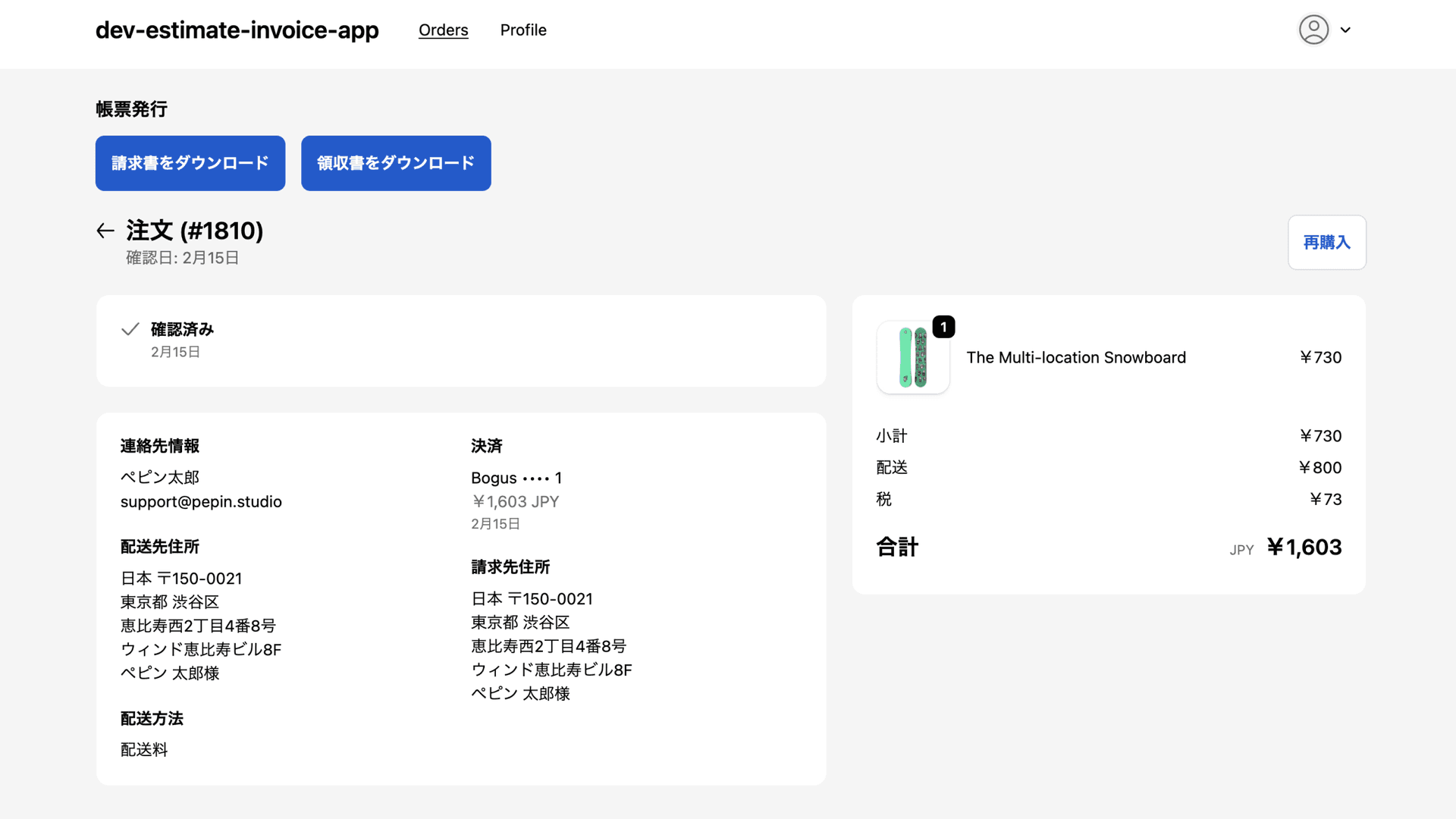
Customers download receipts, delivery notes and invoices from their order history themselves. They also enter the billing name and purpose, so "please change the name" requests stop too.
Self-service is available on Basic and above. It uses Shopify's new customer accounts, so customers sign in to issue documents. It does not work on stores that use legacy customer accounts (you can switch in Shopify's settings).
From merchants
What the businesses using it have told us.
We asked businesses we work with to write these reviews. We did not set what they wrote or offer anything in return.
5.0 / 5 · 3 reviews (Shopify App Store, as of 6 October 2026)
We get a lot of requests for receipts and used to make each one by hand, but since installing Maru Invoice the work has become much easier. Customers can issue receipts themselves, so there is almost nothing left for us to do, and the day-to-day workload has dropped considerably. Setup is easy to follow, and it is helpful that it works smoothly inside Shopify. I think it is a very useful app for any shop that wants to make issuing receipts and invoices more efficient.
逢季荘Translated from JapaneseRead the original on the App Store We use it in our online apparel store. Customers can issue receipts and delivery notes themselves, so we get fewer individual enquiries. Documents that meet the qualified invoice rules are easy to issue too, and our daily admin runs more smoothly. I think it is easy to use for apparel businesses, which have many SKUs and a lot of restocks and re-releases to manage.
Karen MoriyamaTranslated from JapaneseRead the original on the App Store Issuing invoices and preparing shipping labels used to be manual work, and now it is close to a single click. Being able to export carrier label CSVs straight from the order data is especially useful, and it has taken a real weight off the daily workload. The self-issue feature for receipts means requests along the lines of “could you send me an invoice” have all but stopped. I use freee, and because the journal CSV comes out in a format the accounting software takes, the retyping I used to do is basically gone. The small frustrations that piled up day after day cleared all at once.
deblankk.comTranslated from JapaneseRead the original on the App Store
Inside the app
Two settings. Then issue straight from the order.
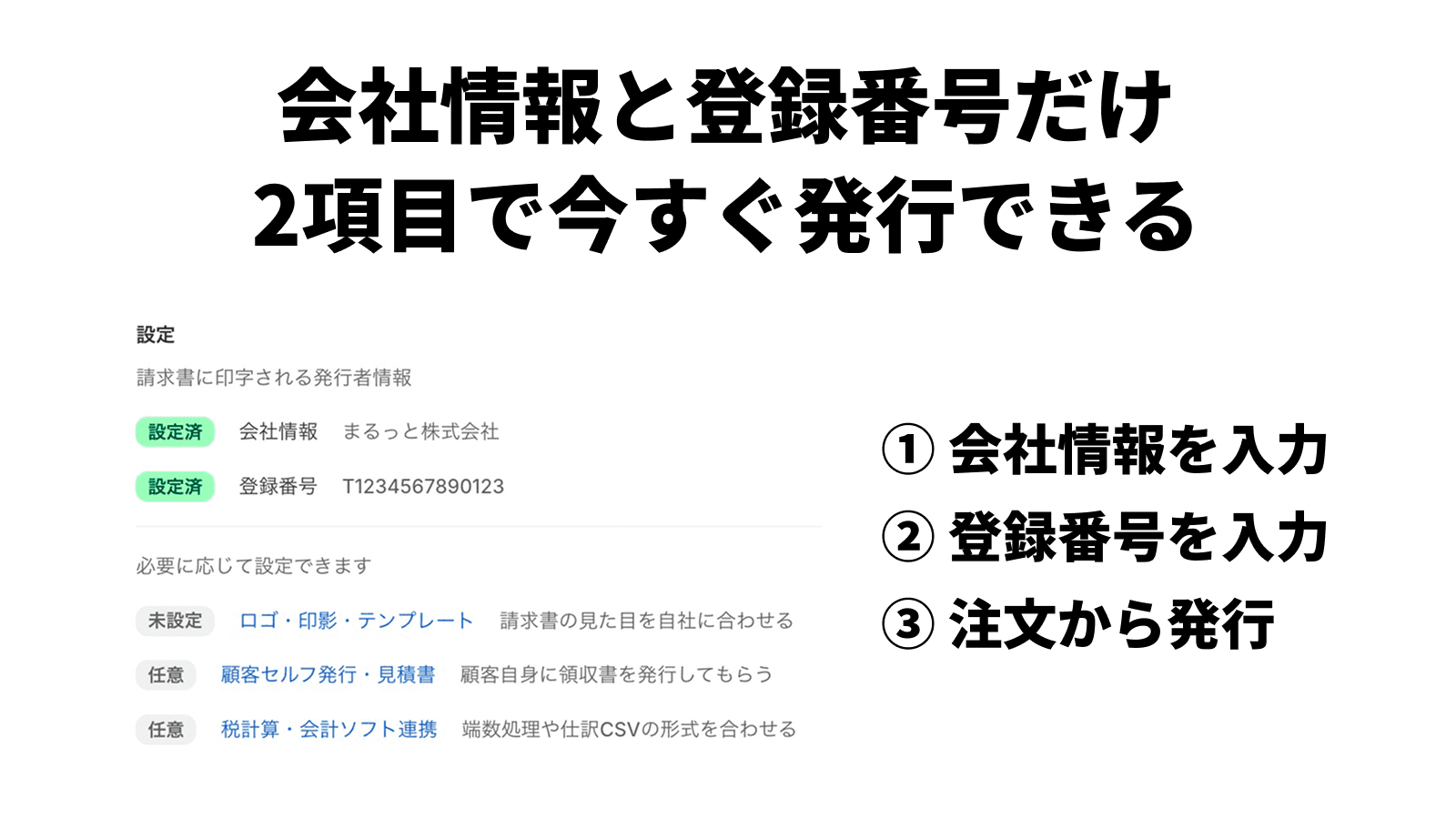
Company details and a registration number are enough to start
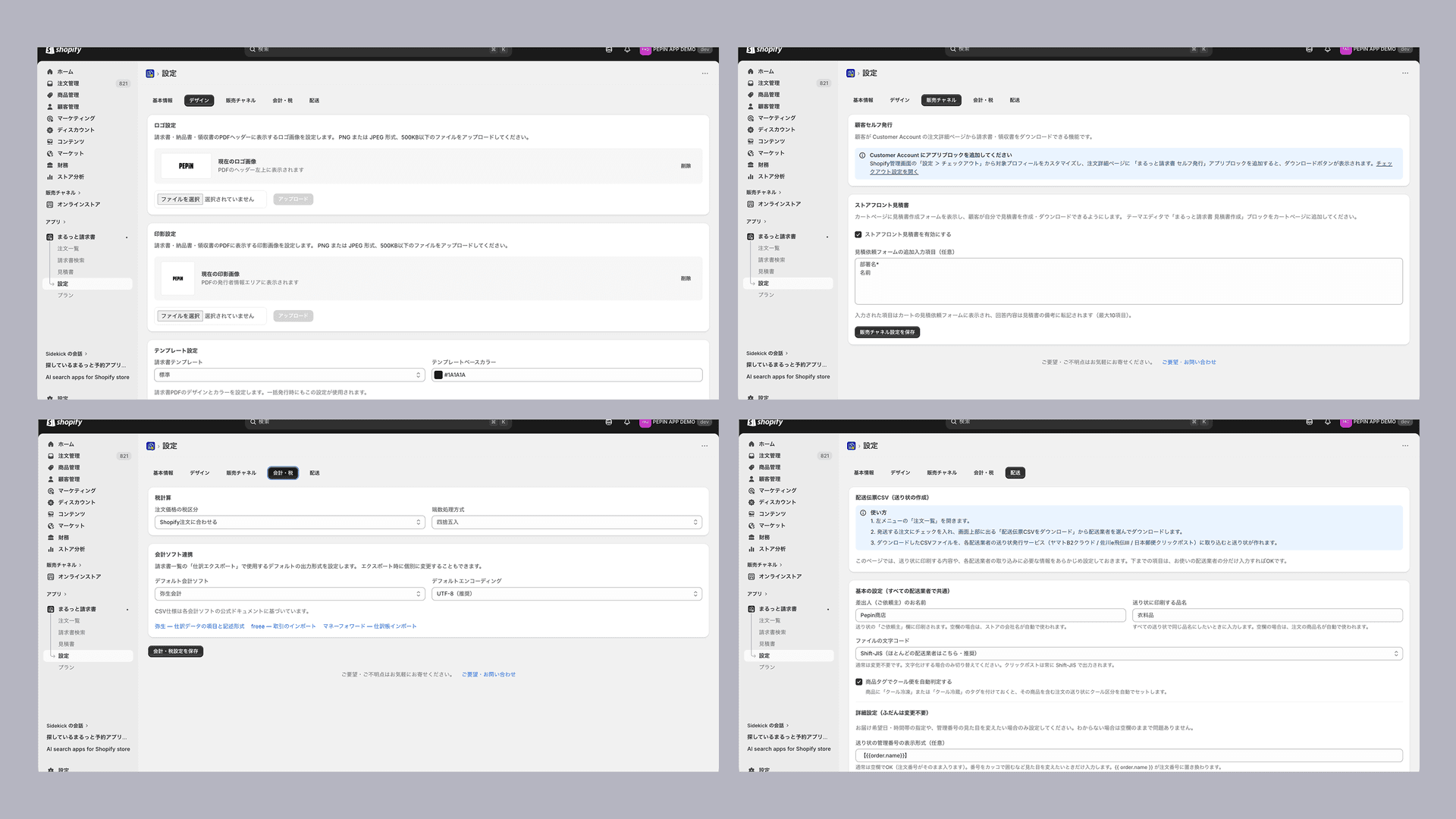
Only two settings are required: your company details and your invoice registration number. Logo, seal, templates, customer self-issue, rounding rules and journal CSV formats can wait until you need them.
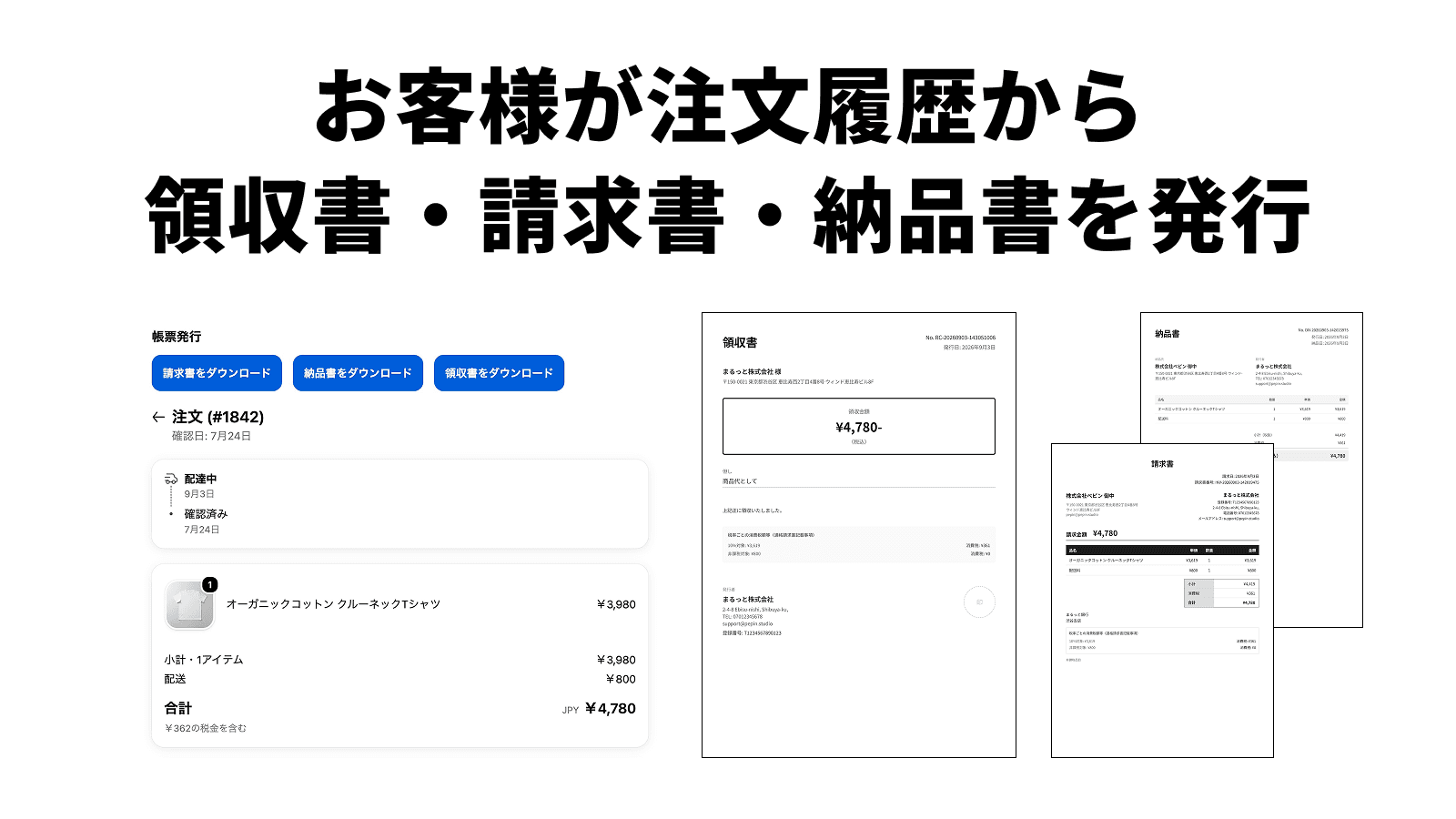
Customers issue their own documents from order history
Customers download receipts, invoices, and delivery notes from their own order history (Basic and above). They type the addressee and the purpose themselves, so the "could you change the name?" emails stop.
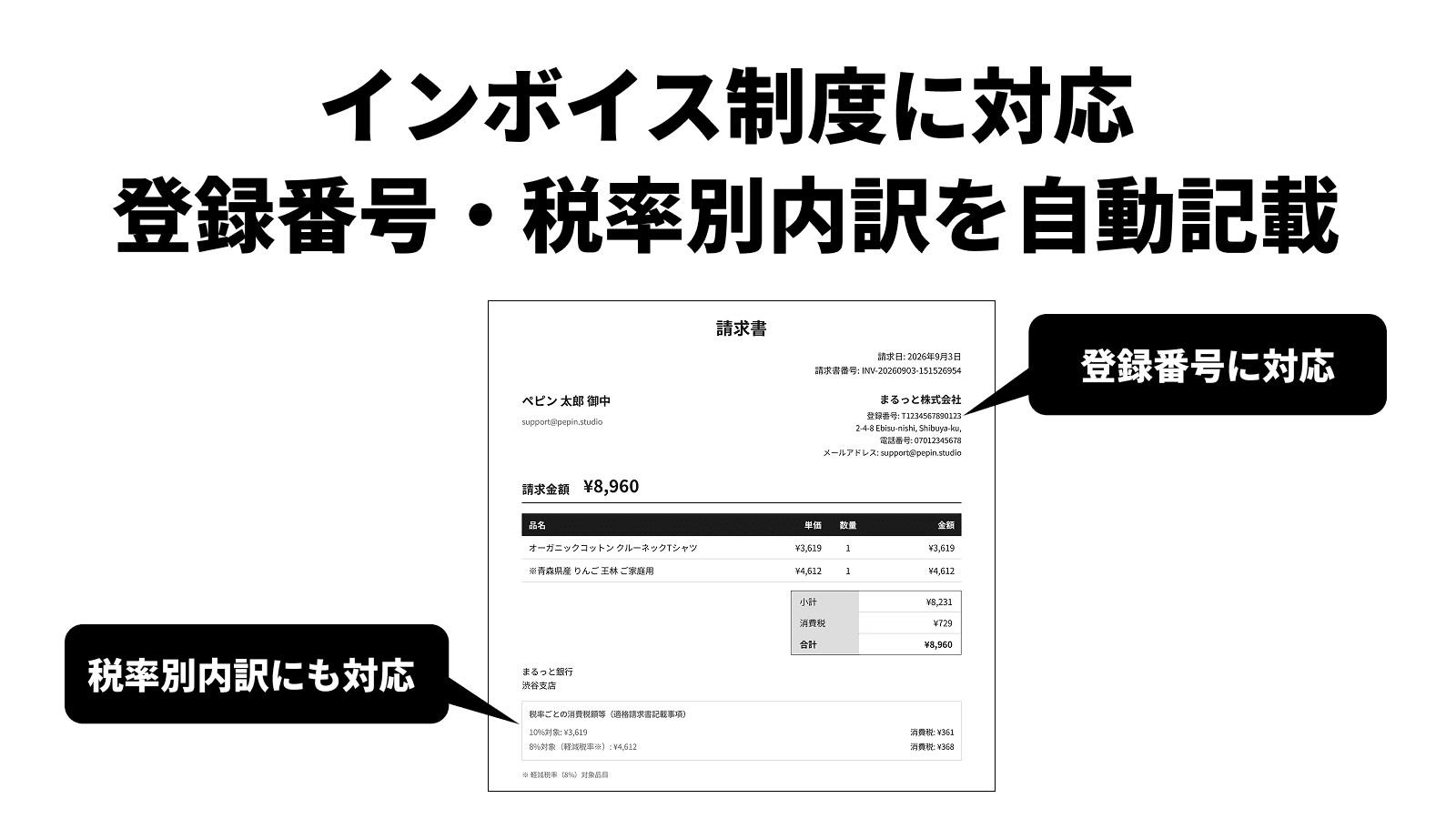
Registration number and per-rate breakdown, filled in automatically
All six items required of a Japanese qualified invoice are covered. Tax is calculated per tax-rate group rather than per line, so rounding happens once per rate per invoice, and reduced-rate lines are marked automatically.
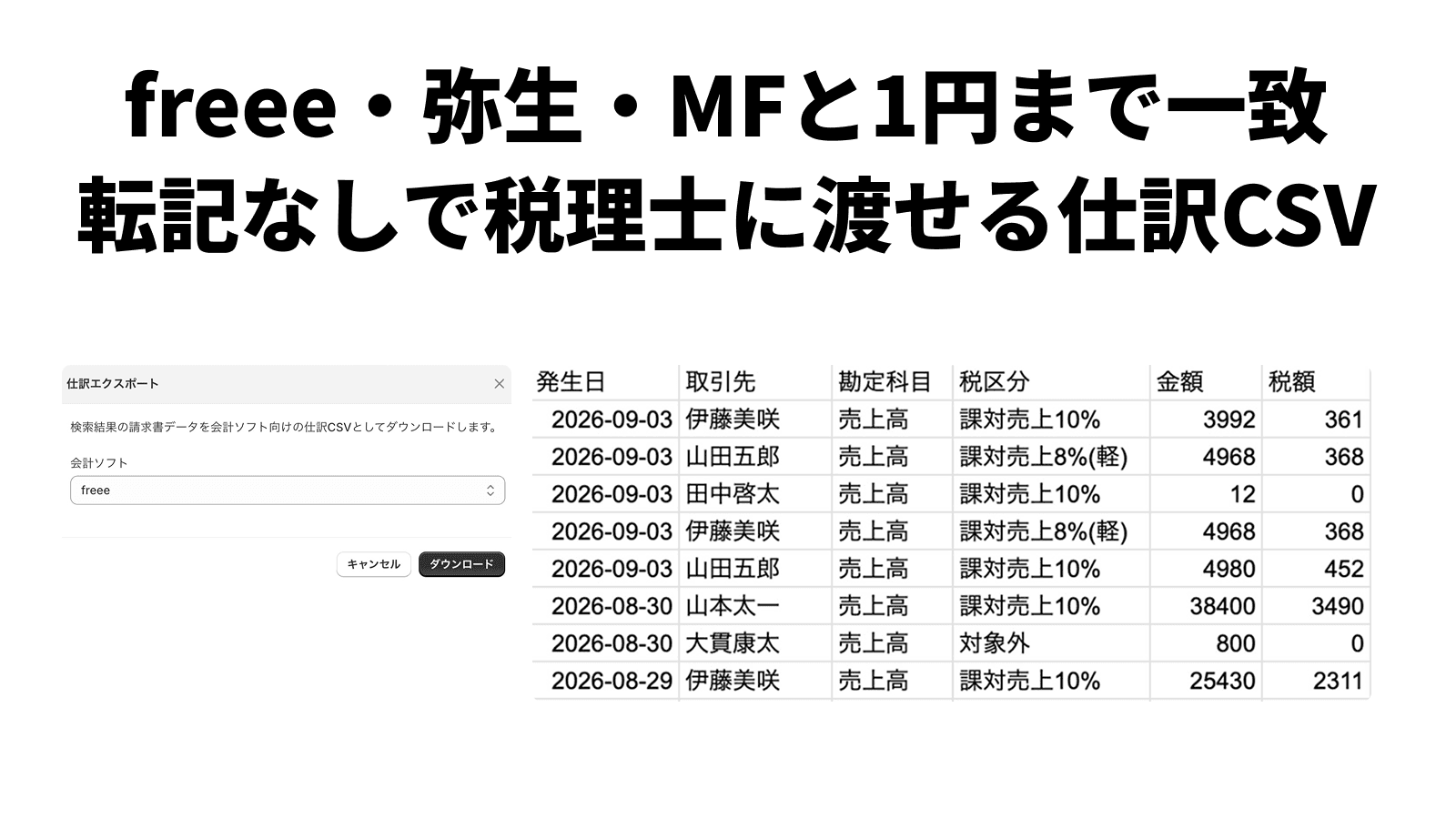
Journal CSVs to hand your accountant, no retyping
Export journal CSVs from your issued invoices in each software's import format, ready to hand to your accountant without retyping. When rounding differs, adjust the tax by rate; adjusted tax carries into Yayoi and freee CSVs (Money Forward recalculates tax on import). Journal CSV is a Pro feature.
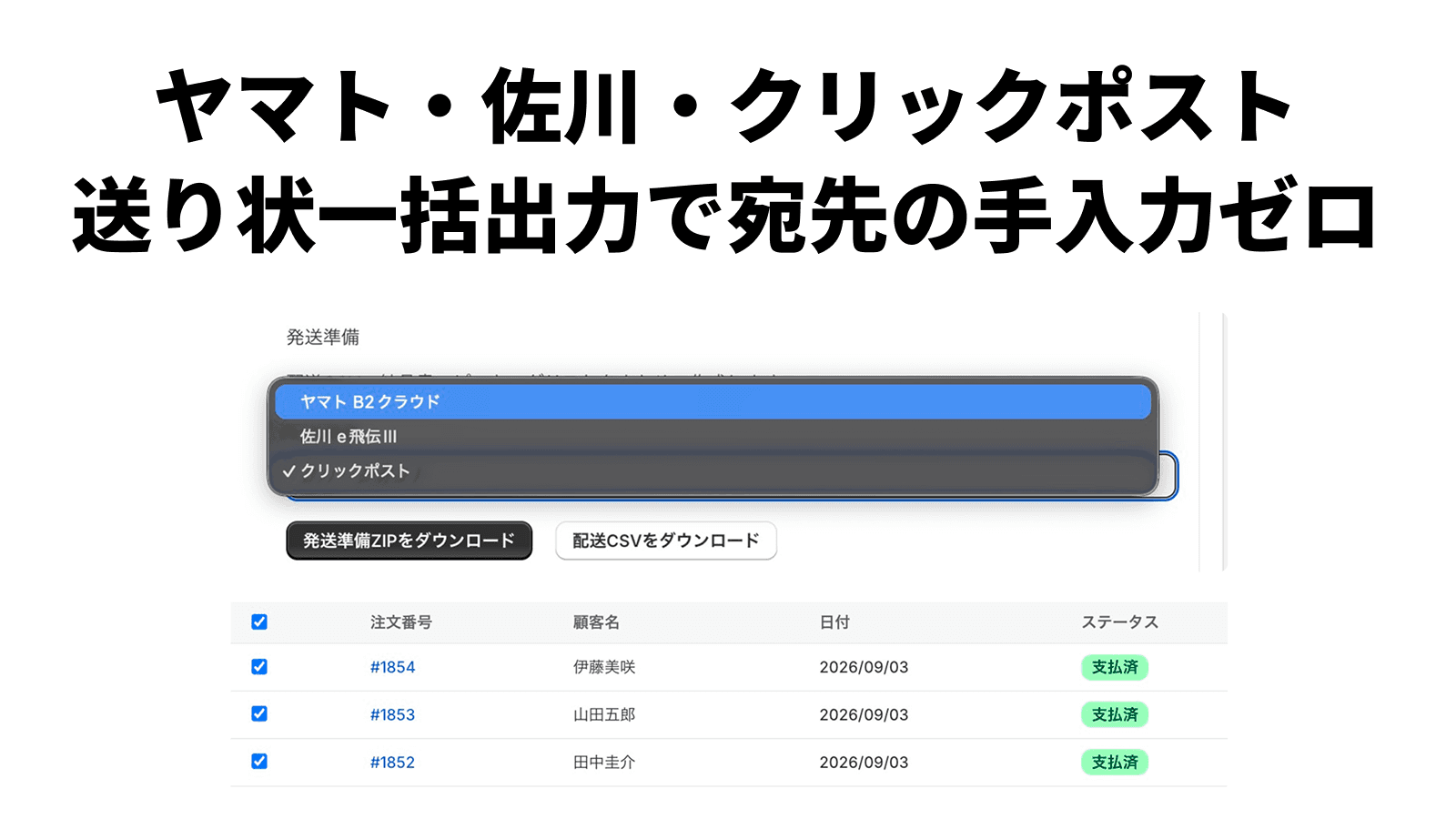
Carrier label CSVs, so addresses are never retyped
Export in Yamato B2 Cloud, Sagawa e-Hiden III, and Japan Post Click Post formats. Prefectures are converted from their codes into Japanese, so carrier imports never break on the romanized names Shopify returns. Label CSVs are a Pro feature.
4 Document Types
Invoices, delivery notes, receipts, and estimates
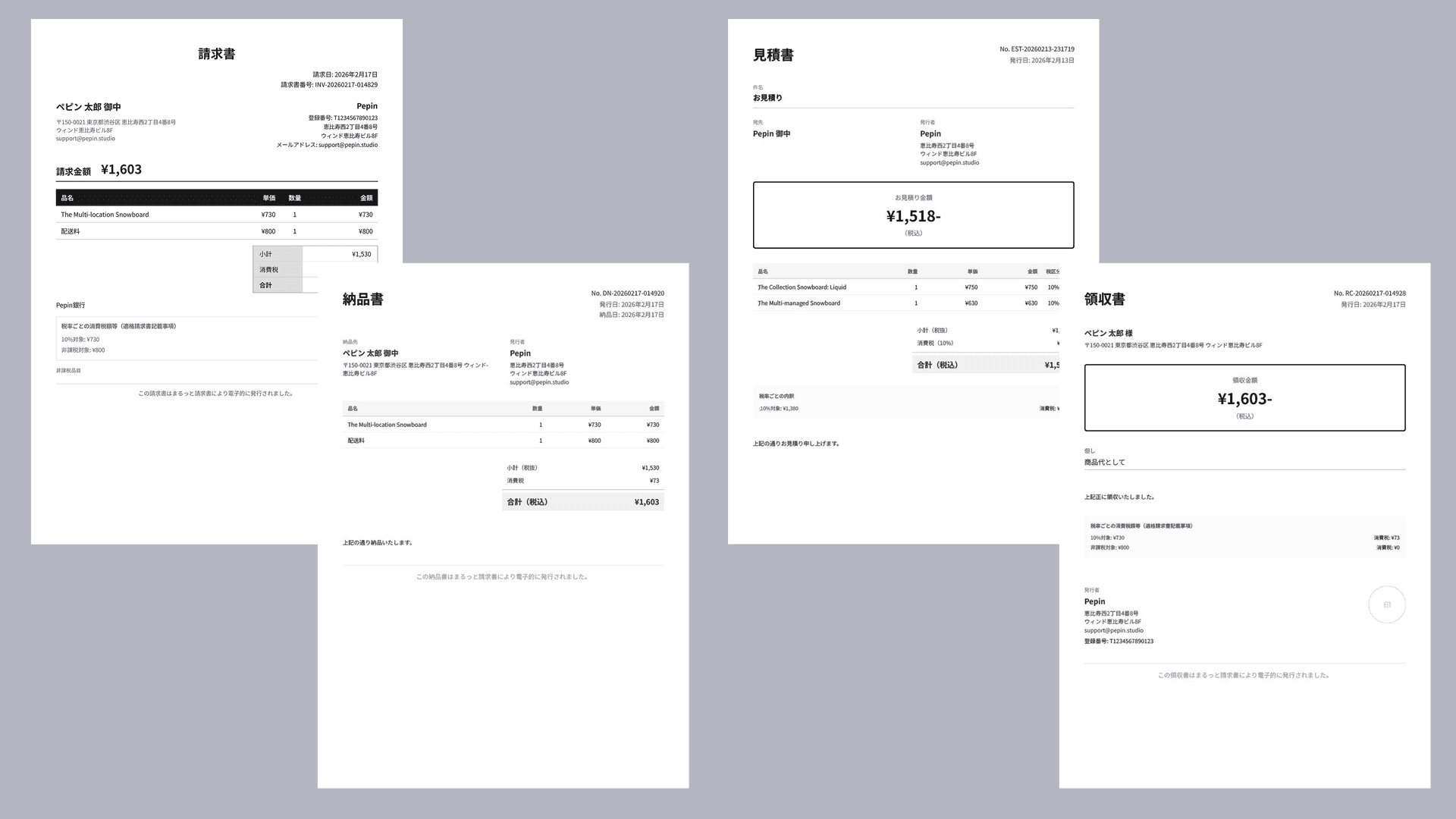
Automatically covers all 6 legal requirements for qualified invoices
Invoices from the free plan, delivery notes and receipts on Basic, estimates on Pro
You can also print straight from Print on Shopify's order page (bulk printing from the order list is Pro)
Monthly billing & B2B
Close at month end, invoice next month. A Japanese B2B habit Shopify has no room for.
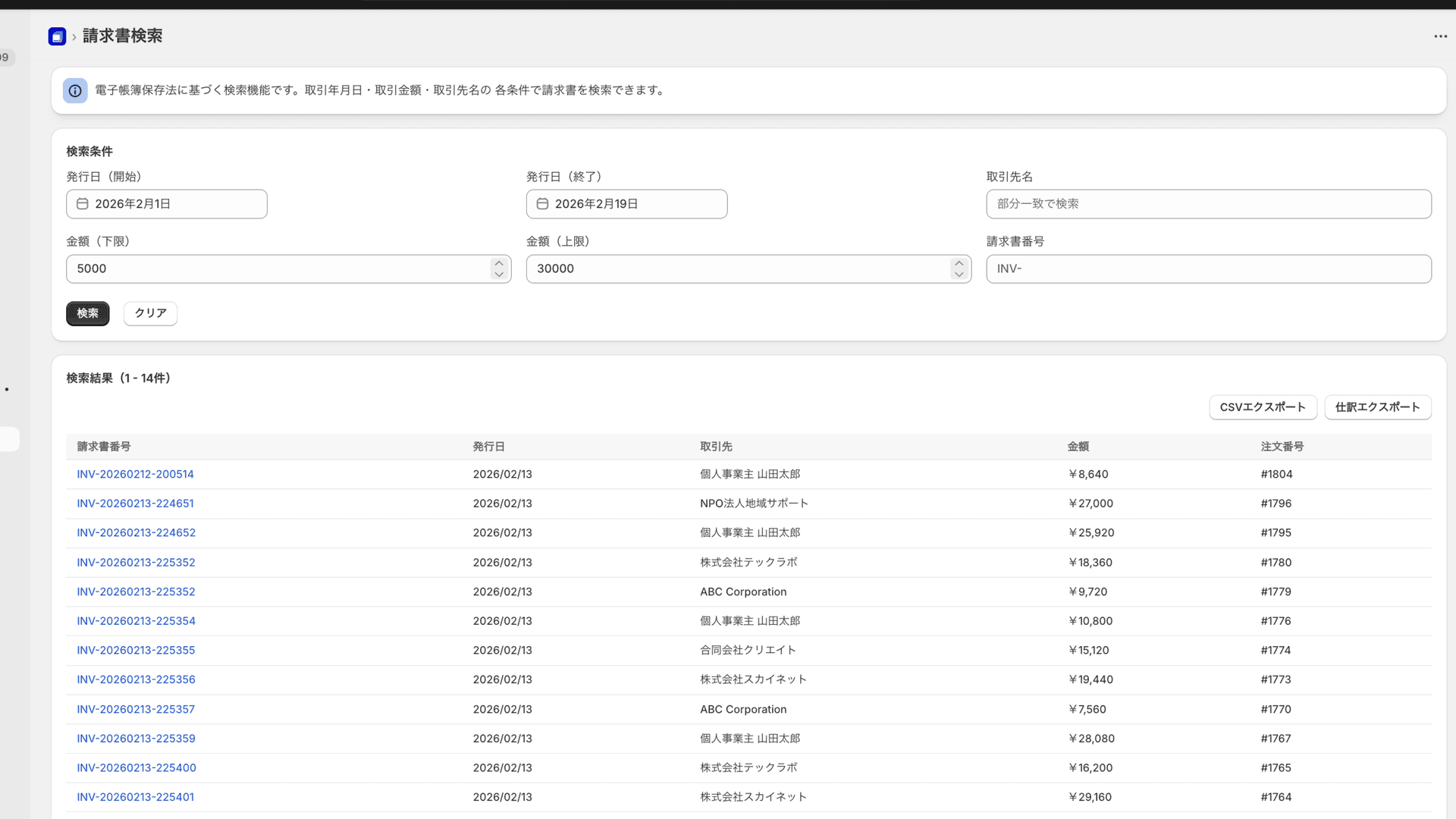
Shopify assumes one payment per order, so month-end billing for business customers does not work out of the box. On Pro, register your business partners and combine each partner's orders into one invoice. Register payment terms and the due date is filled in for you.
Many orders, one invoice
Roll up to 50 orders from the billing period into a single invoice. Tax is recalculated per tax-rate group after consolidation, so rounding happens once per rate per invoice — which is what the Japanese qualified invoice rules require, and what simply summing each order’s tax would break.
Register partners, then just pick them
Register a partner's company name, address and email once, then pick them as the addressee for consolidated invoices, order invoices and estimates. No more retyping.
Due dates from payment terms
Give a partner terms such as "end of next month" or "prepayment, N days after issue", and the invoice notes get a line like "Payment due: Oct 31, 2026". End of next month means the month after the billing period for consolidated invoices, and after the issue date for order invoices.
Connected to Shopify B2B companies and locations
Link a Shopify B2B company to a customer record and filter orders by company or location. A single invoice can break line items out per location with per-location subtotals. No extra permission scopes required.
Bill only what shipped this month
Switch the billing unit from per-order to per-fulfillment and you bill what shipped before the cut-off, leaving the rest for next month. Billed fulfillments are recorded, so the same shipment can never be billed twice. Shipping is charged once per order.
What is not being billed stays visible
Unshipped items, items outside the period, and held shipping charges are each listed with the reason they were left out — so when a total looks wrong, you can tell a missed charge from intended behavior before issuing.
Orders that mix currencies or tax-inclusive and tax-exclusive modes cannot be consolidated, to prevent mis-billing. Consolidated invoices and bulk issuing are capped at 50 orders.
Accounting Integration
freee, Yayoi, MoneyForward — direct import
UTF-8 / Shift-JIS selectable
Adjusted tax carries into Yayoi and freee CSVs (Money Forward recalculates on import)
Shipping Label CSV
Shipping labels, too — in one click
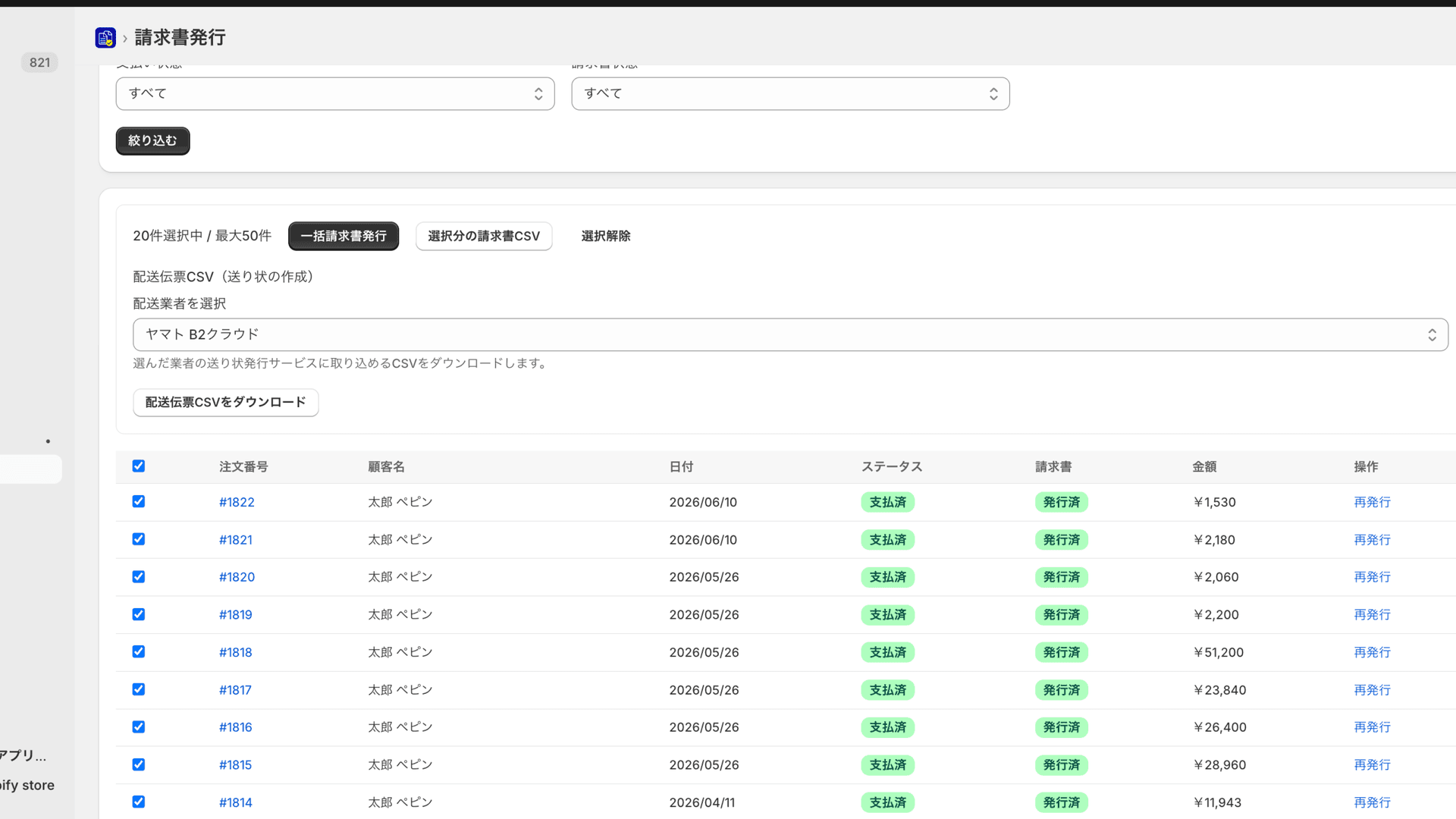
Export shipping label CSVs for Yamato B2 Cloud, Sagawa e-Hiden III, and ClickPost straight from your selected orders. Cash-on-delivery, cool delivery, and delivery date are filled in automatically — no more manual label work at month-end.
Yamato B2 Cloud
CSV for B2 Cloud import
Sagawa e-Hiden III
CSV for e-Hiden III import
ClickPost
CSV for batch submission
Shipping prep bundle — labels, picking list, and packing slips in one download
For the orders you select, get the carrier label CSV, a picking list (CSV and PDF), and each order’s packing slip PDF in a single ZIP, instead of preparing them screen by screen. Prefectures are converted from their codes into Japanese, so carrier imports never break on the romanized names Shopify returns.
Tax Adjustment
If rounding differs from your accounting software,adjust the tax by rate
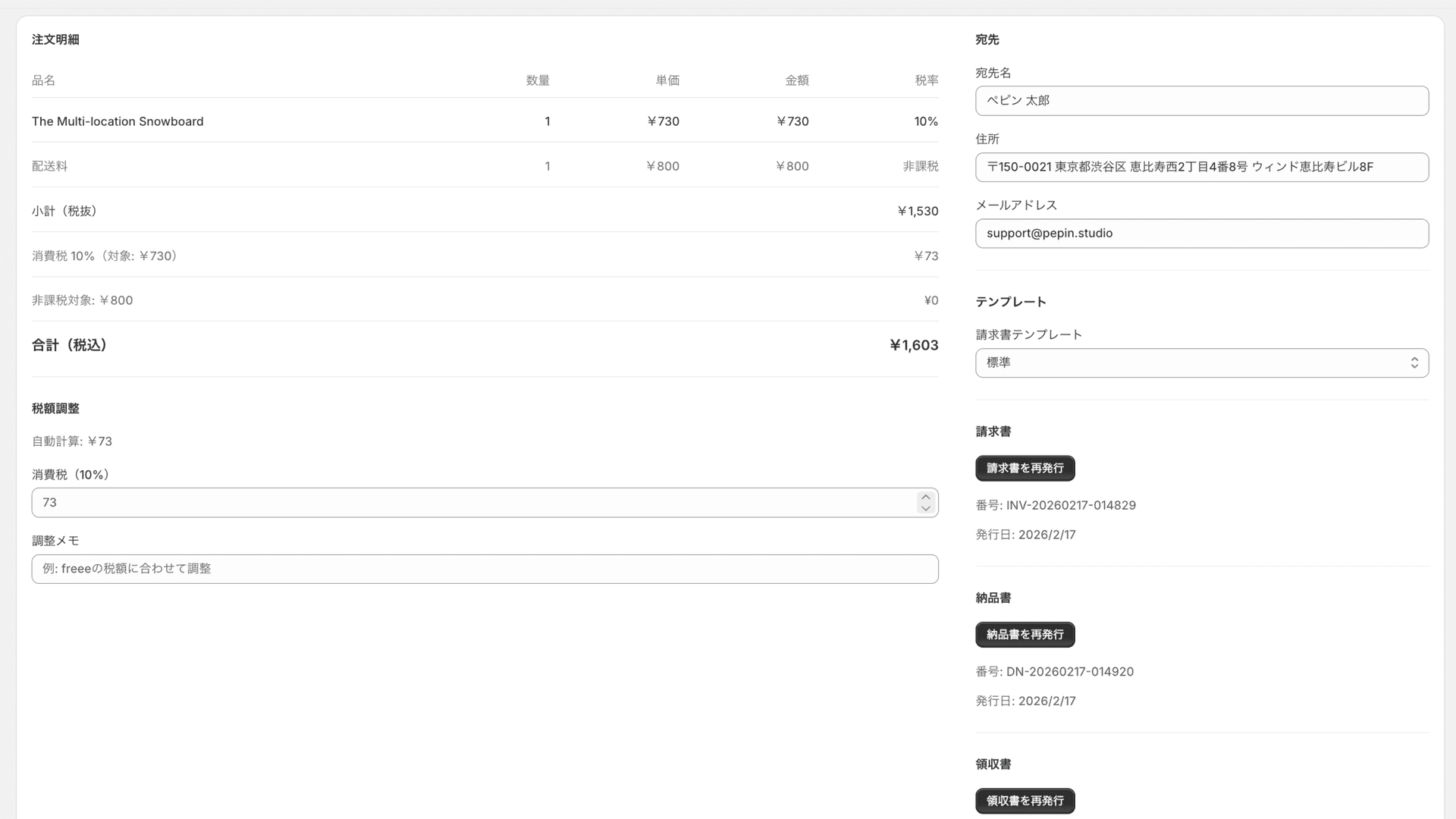
Shopify's automatic tax, Japan's invoice rounding (once per tax rate) and your accounting software can differ by a few yen. When you want to match your accounting software, adjust the 10% and 8% tax amounts separately, to the yen.
Checks before you issue
Catch invoice mistakes before you issue
Maru Invoice flags hard-to-spot mistakes that come from your Shopify settings or the state of an order. It never blocks issuing, so you can check and carry on.
Missing tax on shipping
If "Charge sales tax on shipping rates" is off in Shopify, shipping appears as tax-exempt on the invoice. Maru Invoice warns on orders with taxed items and untaxed shipping, and shows where to fix it.
Forgotten rate changes
When the reduced tax rate changes, Maru Invoice warns on lines whose rate could not apply on the order date. It is ready for the cut to 1% on food planned for April 2027.
Refunds and order edits
Lines removed by refunds or order edits stay off the invoice. If amounts outside the line items, such as tips or fees, make the total differ from the order, you are told.
Compliance
Invoice system & e-bookkeeping law compliant

Qualified Invoice System
Electronic Bookkeeping Law (search requirements)
Ready for the 1% food tax rate in April 2027
On 15 September 2026 the Japanese cabinet approved an outline cutting the consumption tax on food to 1% for two years from April 2027 (the bill has been prepared for the extraordinary Diet session and is not yet enacted). Maru Invoice does not hardcode tax rates — it calculates from each order’s effective rate — so tax calculation, PDFs, and the admin already work at the new rate.
One exception: the tax category labels written into accounting journal CSVs do not cover 1% yet. That waits until each accounting vendor publishes its own 1% category code, because a guessed code fails on import.
Templates
Documents that match your brand
Standard
Professional default design
Classic
Bordered, monochrome, traditional layout
Compact
Small font, for many line items (~40 lines/page)
Custom HTML
Full freedom with Liquid templates
Simple Pricing
Start on the free plan (5 invoices per month, invoices only). Both paid plans are free to try for 7 days
FreeFree
For trying an invoice on a real order first
Up to 5 per month · invoices only · all six qualified-invoice fields · no credit card
Basic
Customer self-service, automatic issuing and branding for everyday documents
Core
- Invoice generation
- Delivery note generation
- Receipt generation
- Invoice search (e-bookkeeping compliant)
- CSV list export
- Standard template
- Customer self-service for receipts and more
- Automatic issuing when an order is paid
Customization
- Tax amount manual adjustment
- Template selection (4 types)
- Logo placement
- Company seal placement
- Custom fonts
- Theme color customization
Pro
Accounting CSV, carrier labels and bulk issuing for B2B
Pro features
- Estimates
- Bulk PDF generation (ZIP)
- Shipping label CSV (Yamato/Sagawa/ClickPost)
- Accounting journal CSV
- Month-end consolidated invoices (subtotals by location)
- Business partners and automatic due dates
- Shopify B2B companies and locations
- Storefront estimate form
Billed in USD together with your Shopify bill.
FAQ
Frequently asked questions
What is Maru Invoice?
A Japan-focused app that issues invoices, delivery notes and receipts that meet Japan's invoice rules, plus estimates, from the Shopify admin. Customers can issue receipts and more from their order history themselves, and the app also exports accounting journal CSVs and shipping label CSVs. There is a free plan, and paid plans are free to try for 7 days.
What happens when tax differs from my accounting software?
You can override the 10% and 8% tax amounts separately, to the yen, and keep a note of why. Adjusted tax carries straight into Yayoi and freee journal CSVs. Money Forward recalculates tax automatically on import, so check the tax after importing any invoice you adjusted.
Can I export shipping label (delivery slip) CSVs?
Yes. From your selected orders, you can export shipping label CSVs for Yamato B2 Cloud, Sagawa e-Hiden III, and ClickPost in one click. Cash-on-delivery, cool delivery, and delivery dates are auto-filled, and you can choose UTF-8 or Shift-JIS. Shipping label CSV is a Pro plan feature.
Which accounting software is supported?
You can export journal CSVs in the formats freee (transaction import), Yayoi (journal entry) and Money Forward (journal import) specify, eliminating manual data entry. You can choose UTF-8 or Shift-JIS. Accounting journal CSV is a Pro plan feature.
Can customers download receipts and invoices themselves?
Yes. On Basic and above, customers download receipts, delivery notes and invoices from their order history page. They also enter the billing name (company, department, contact) and the purpose on receipts. It uses Shopify's new customer accounts, so customers sign in to issue documents (it does not work on stores with legacy customer accounts). The shop chooses which documents are available. On Pro, customers can also create estimate PDFs from the cart page.
Is it compliant with the invoice system and e-bookkeeping law?
Yes. It automatically covers all 6 legal requirements for qualified invoices, and meets the search requirements of the Electronic Bookkeeping Law (search by transaction date, amount, and business partner name).
Can I customize the document design?
In addition to 4 templates (Standard, Classic, Compact, and Custom HTML), you can set a logo, company seal, custom fonts, and theme color to match your brand.
Tell me about the pricing plans and free trial.
Three plans: Free (5 invoices per month, invoices only, no credit card required), Basic ($9.99/mo) and Pro ($19.99/mo). Both paid plans include a 7-day free trial. Customer self-service, automatic issuing on payment and tax adjustment start on Basic; shipping label CSV, accounting journal CSV, bulk PDF generation, estimates and month-end consolidated invoices are on Pro. Prices are billed in USD.
Does it support month-end consolidated billing for B2B (wholesale) customers?
Yes. On the Pro plan you can register business partners and combine multiple orders into one consolidated invoice. It links to Shopify B2B companies and company locations, so you can filter orders by partner or location and issue a month-end consolidated invoice with per-location subtotals. Qualified-invoice requirements are still met.
Which plan includes estimates (quotes), and who can issue them?
Estimate creation and management is a Pro plan feature. You can issue estimates from the admin by picking products or entering item names and prices, and if you add the estimate form to your cart page, customers can download an estimate PDF of their cart themselves. Estimates can carry a subject and notes. Each estimate is saved as a Shopify draft order, so once the deal is agreed you send the invoice from Drafts in your Shopify admin to turn it into an order.
How do I set the qualified invoice registration number and tax categories?
Enter your company details and your qualified invoice issuer registration number (T + 13 digits) once during setup, and every document includes them automatically. Totals and tax amounts are split by the 8% (reduced) and 10% rates from the order data, and if the rounding differs from your accounting software you can adjust each rate to the yen.
Can I bill only what shipped this month and carry the rest to next month?
Yes, on Pro: switch the billing unit from per-order to per-fulfillment. You bill what shipped before the cut-off date and carry the rest into the following month. Billed fulfillments are recorded, so the same shipment cannot be billed twice. Shipping is charged once per order, and anything left out is shown on screen with its reason — not yet shipped, outside the period, or shipping charge held.
Will it support the 1% food tax rate in April 2027?
Tax calculation, PDFs, and the admin already work at the new rate, because rates are derived from each order’s effective rate rather than hardcoded. Only the tax category labels in accounting journal CSVs are pending, until each accounting vendor publishes its 1% category code. Note that the reduction was approved as a cabinet outline on 15 September 2026 and the bill is not yet enacted.
Can I print from Shopify's order page?
Yes. From Print on Shopify's order page, choose an invoice, delivery note or receipt and print it. A document that has not been issued yet is issued and printed on the spot once you tick the confirmation. Printing several orders selected in the order list is a Pro feature, up to 50 at a time (invoices only). On the free plan you can print invoices only (up to 5 per month).
Can partners fill in the addressee and payment due date for me?
Yes. On Pro, register partners (company name, address, email) and pick them as the addressee for consolidated invoices, order invoices and estimates. If you register payment terms (end of next month, or prepayment a set number of days after issue), a line such as "Payment due: Oct 31, 2026" is added to the invoice notes automatically. For end-of-next-month terms, consolidated invoices are due at the end of the month after the billing period ends, and order invoices at the end of the month after the issue date. A due date you wrote yourself is never overwritten. Link a Shopify B2B company to filter the order list by partner.
Get started with Maru Invoice.
Live on the Shopify App Store. Start on the free plan, and try the paid plans free for 7 days.