
 Maru Booking | Booking for Shopify
Bookings, payments, and customer management. All together in Shopify.
Keep products and bookings together. From order events and pop-ups to fittings and salons, run it all from one Shopify store.
Zero booking fees
No extra percentage fee as your number of bookings and revenue grow.
Booking management
Manage slots, staff, and rooms in one screen, and prevent double bookings.
Shopify customer data
Keep product purchases and booking history in the same customer record.
Japanese screens and support
The admin and the customer booking screens work in Japanese and English (12 languages in all). Setup and support come from our team in Japan.
Wherever bookings happen,Maru Booking fits.
Add bookings for time and experiences to the Shopify store where you already sell products. The four examples below are representative—Maru Booking also works across many other booking businesses.

Order events & pop-ups
Turn fittings and visits into bookable time slots, avoid crowding, and connect the experience to purchases in the same store.
See the apparel use case
Hair & beauty salons
Show services, staff, and availability clearly. Every booking leaves customer data behind.
See the salon use case
Classes & workshops
Sell limited-capacity experiences as products and keep attendee details alongside related product purchases.
See the classes & workshops use case
Personal training, yoga & Pilates
Bring trial bookings, staff, and equipment together, then connect visits to repeat bookings and retail.
See the fitness studio use caseMore use cases
And it goes far beyond these four.
If your service uses time slots, capacity, or staff assignments, Maru Booking can handle the booking flow. Create bookable products for events, lessons, spaces, equipment rentals, and more.
- Hair Salons
- Spas & Massage Studios
- Tattoo Studios
- Fashion Styling & Hairdressing
- Tutoring
- Consulting & Seminars
- Museums
- Live Venues & Festivals
- Events & Workshops & Classes
- Pop-up Stores
- Retail Stores
- Rental Spaces
- Equipment & Costume Rentals
- Activities & Experiences
What the businesses using it have told us.
We asked businesses we work with to write these reviews. We did not set what they wrote or offer anything in return.
5.0 / 5 · 3 reviews (Shopify App Store, as of 6 October 2026)
I wanted to add bookings to our Shopify store, so I started using this app. The initial setup was very easy to follow, and I was able to build a booking page smoothly without any specialist knowledge. Being able to manage product sales and bookings together in the same store is convenient too. There is no usage-based charge per booking, and the flat monthly fee is reassuring. The admin is in Japanese and easy to use, and everything from bookings to customer records is in one place, so I would recommend it to anyone running a booking-based business such as a shop, a salon or events.
逢季荘Translated from JapaneseRead the original on the App Store Getting to the point of taking bookings was genuinely smooth. Just following the guide was enough to set up our menu and time slots. The admin is in Japanese and easy to understand, so we could share it with our staff right away. Replies are very quick too, which is reassuring.
emon.co.jpTranslated from JapaneseRead the original on the App Store Customers can find a product they like and go straight on to book an in-store fitting, which makes it easy to give them a reason to visit. Because we can check the booking history, we know which products they are interested in and what they have bought before they arrive, so it is easier to make suggestions. It also connects with Google Calendar, which makes fitting bookings around staff shifts smooth. We could start without any code, and there is no fee even as bookings grow, so we felt comfortable using it!
Karen MoriyamaTranslated from JapaneseRead the original on the App Store
Get started in three simple steps.
No code required. Create booking products and calendars directly from Shopify admin.

Step 01
Add the app
Install from the Shopify App Store. Your store and booking data connect automatically.

Step 02
Set availability
Add services, dates, capacity, and staff. Set booking cutoffs and cancellation deadlines to match your operation.

Step 03
Start taking bookings
Add the calendar to a product page and go live. Manage bookings and customer details in Shopify. On Pro, you can also add bookings to Google Calendar or export them as ICS files.
From install to the first booking,nothing to puzzle over.
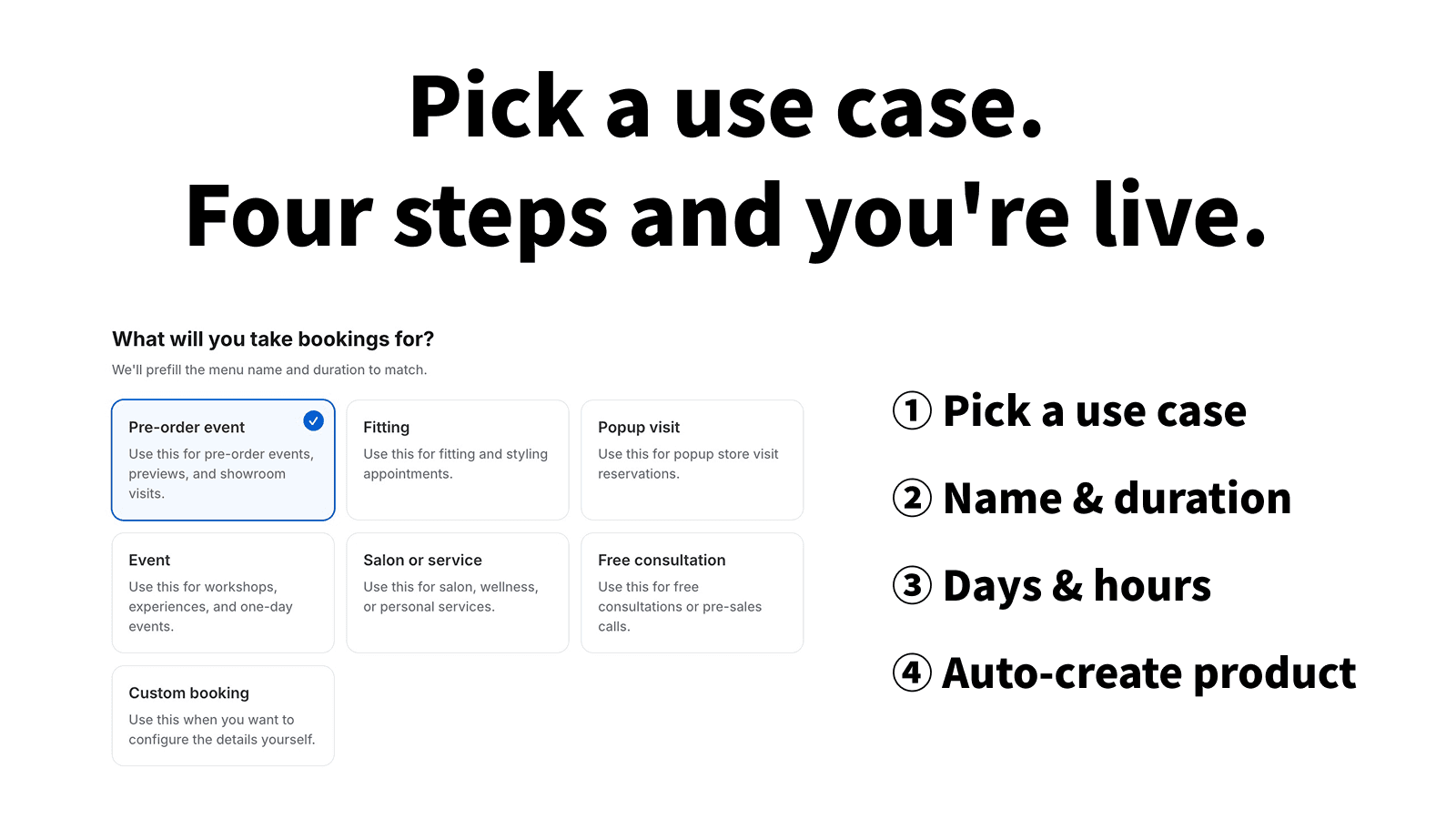
Four steps, starting from what you book
Pick your use case — pre-order events, fitting appointments, pop-up visits, workshops, salon services, free consultations — and menu names and durations are pre-filled. Set the days and hours you accept, and the booking products are created for you.
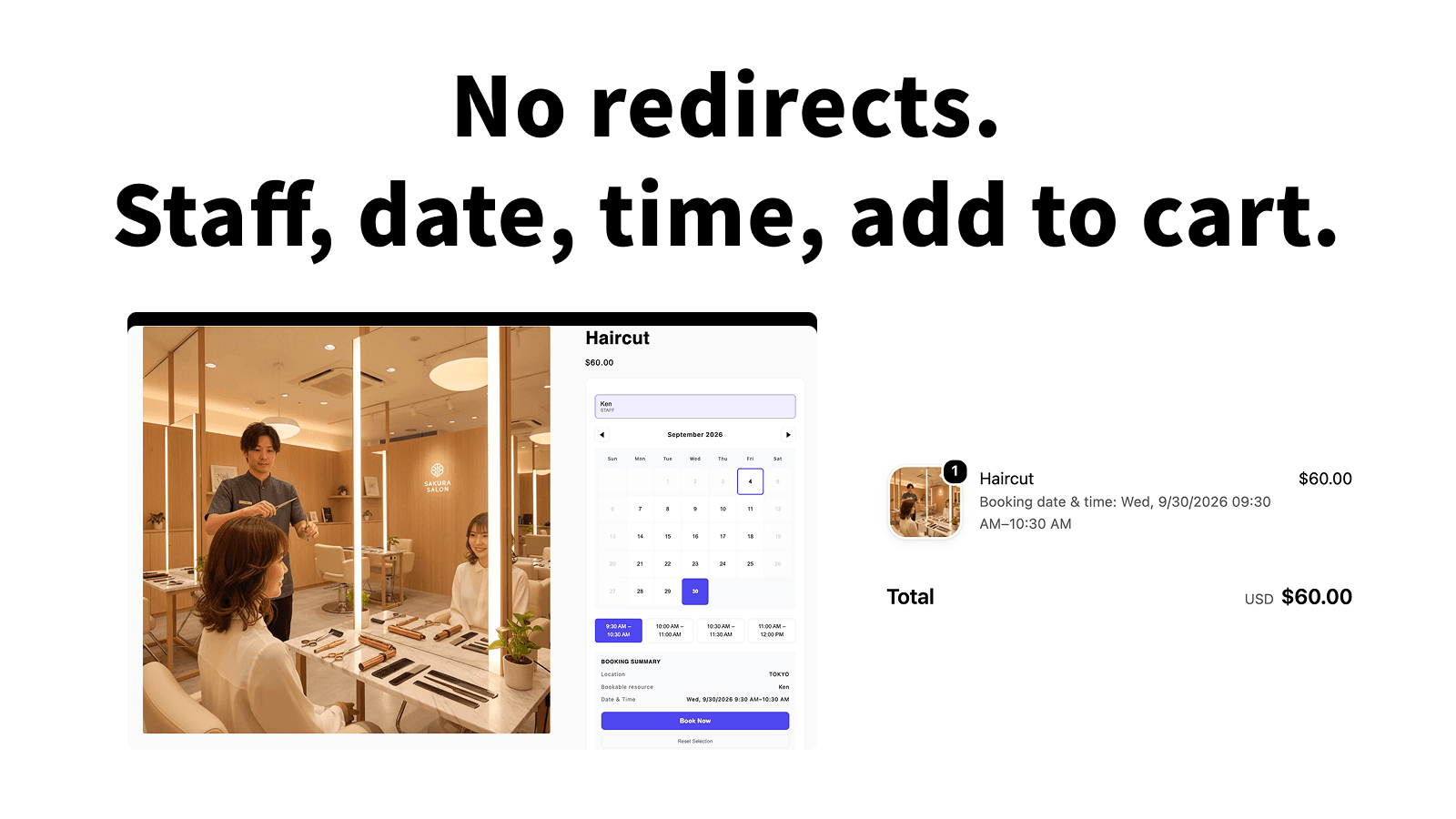
Choose staff and time on the product page, then straight to cart
Booking happens inside the Shopify product page — no hand-off to another site. Pick a person and an open slot, and the appointment time travels into the cart, with checkout still handled by Shopify.
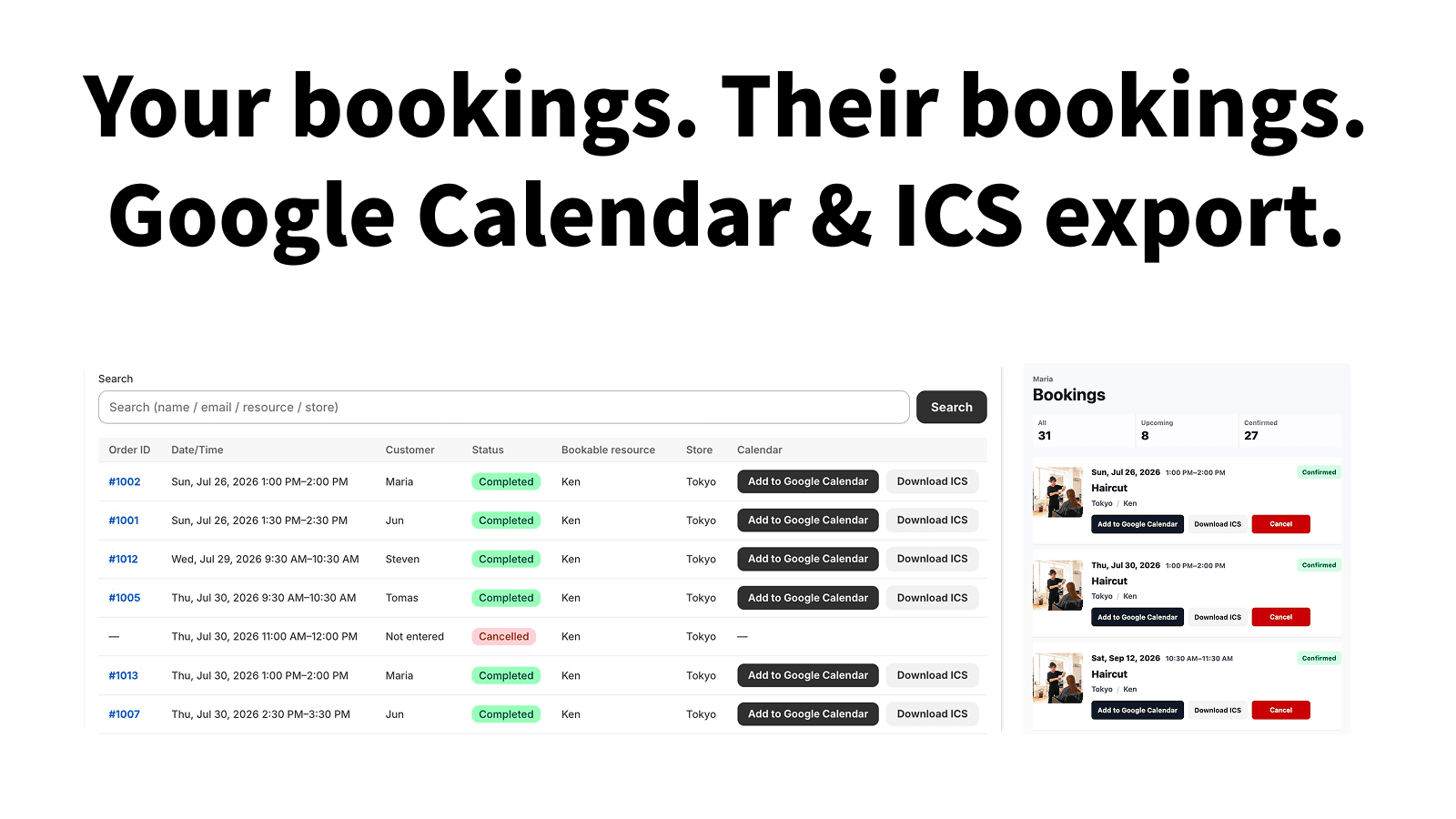
The same booking, on both sides of the counter
The admin tracks visited, cancelled, and no-show states in one list, filterable by period and exportable to CSV. On every plan, customers can view and change their own bookings on their account page, and cancel them within the cancellation window.
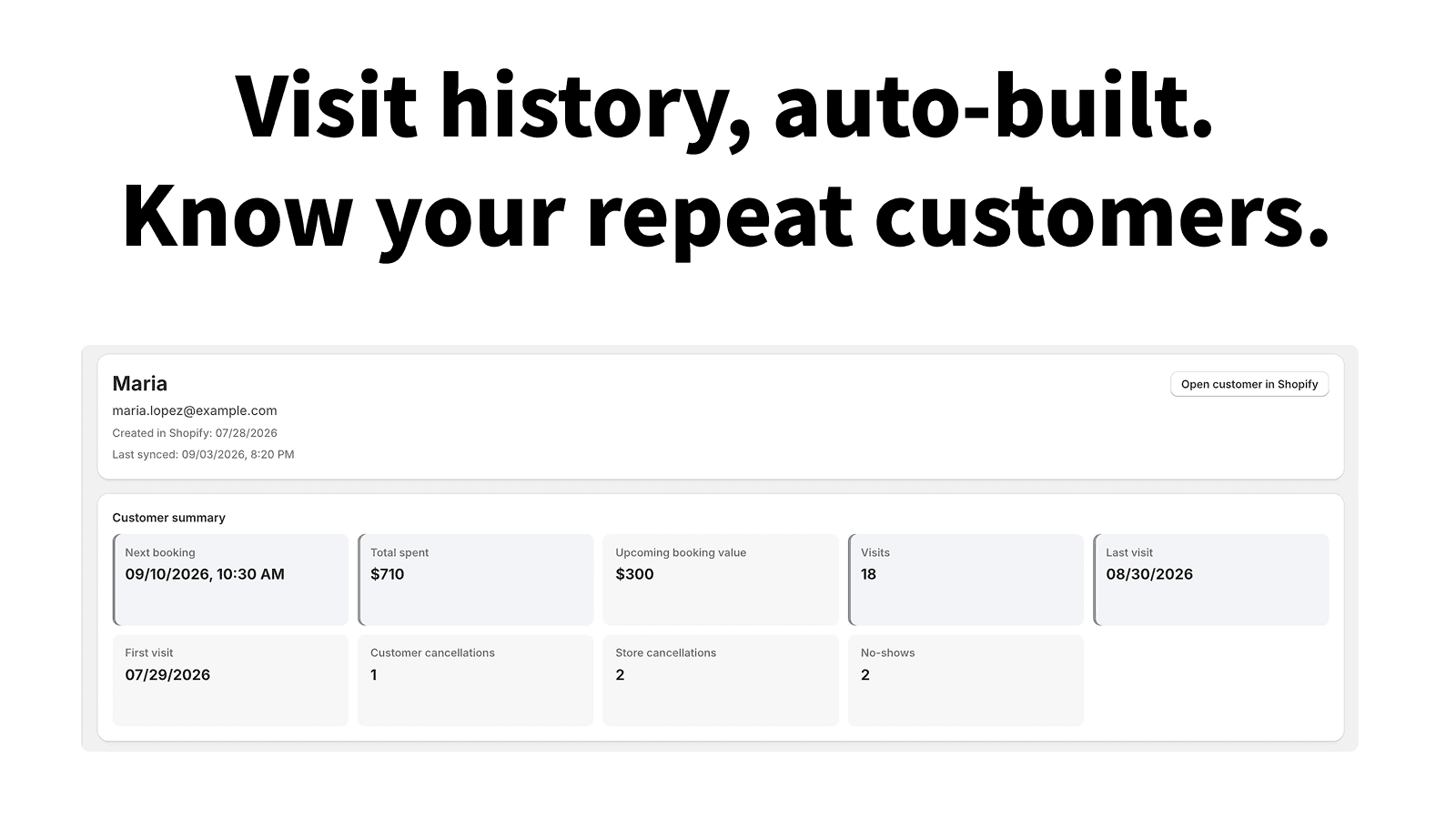
Visit history becomes the customer record
Visit count, lifetime spend, first and last visit, and no-show count build up per customer. Pull the ones who have not been in for a while, sync them to a Shopify customer tag, and use that tag as an email segment.
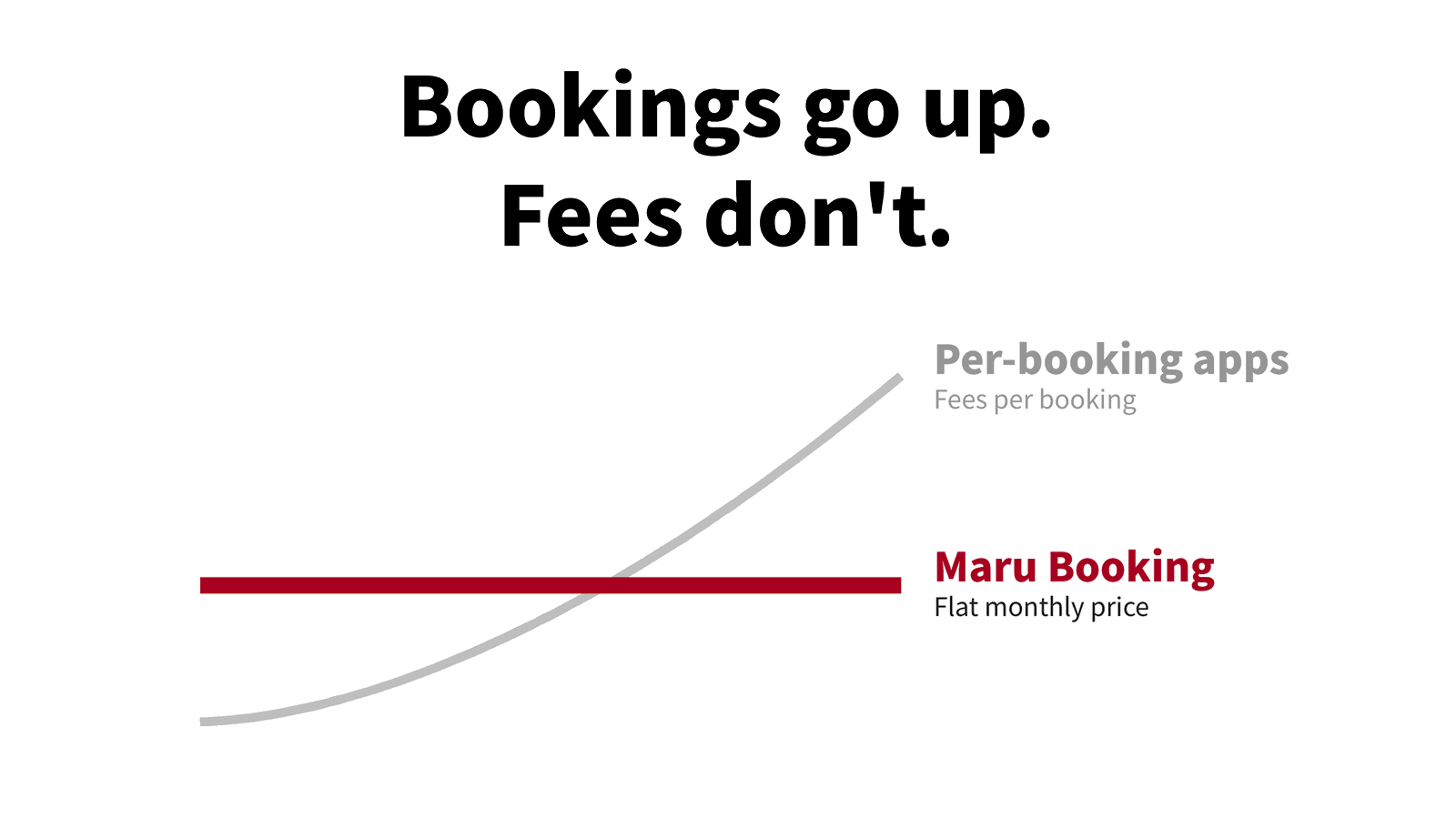
More bookings, same monthly price
There is no per-booking fee — no usage-metered billing path exists in the implementation at all. The further volume grows, the wider the gap with commission-based booking portals.
Order events, pop-ups, and fitting appointments, all in Shopify
Maru Booking works not only for salon bookings, but also for apparel order events, pop-up stores, fitting appointments, exhibition visits, and workshops. From Instagram announcements to Shopify product pages, booking forms, pre-event guidance, and day-of operations, we design the full path from booking to purchase.
Event booking flows tend to fall apart
- Announcements on Instagram
- Bookings in DMs
- Customer details in Google Forms
- Payment on the day
- Receipts issued manually
- Cancellations handled one by one
- No product purchase path after booking
With Maru Booking, booking intake, customer management, and pre-event guidance can all live in Shopify.
Unify the booking flow
Organize booking flows that were split across Instagram, DMs, Google Forms, and on-site payments into Shopify.
Reduce no-shows with reminders
On Pro, we use the Shopify Flow trigger that fires 24 hours before each booking to send reminders through the email or messaging app you already use.
Design the path after booking
Do not stop at booking completion. Connect product pages, email guidance, and repeat purchases after the event.
Get support for Shopify store setup, booking flow design, and Maru Booking configuration in one place.Consult about booking flow design
Something stays behindafter the appointment ends.
ProMost booking apps consider the job done once the slot is filled. On Pro, Maru Booking keeps what builds up afterwards — who came, how often, how much they spent, and when they are due back — per customer, and surfaces the ones who have not been in for a while.
Customer list
Visit count, lifetime spend, first and last visit, next appointment, and cancellation counts in one table. Filter and sort by last visit, visit count, or whether they have ever no-showed.
Customer record
Each customer’s visit history is kept down to the menu, quantity, and whether the appointment was rescheduled. Staff-shared notes travel with the record, so a change of staff does not lose what happened last time.
Win-back follow-up
Set how many days without a visit counts as dormant, and matching customers appear on the admin home screen. Sync them to a Shopify customer tag and use that tag directly as an email segment.
The dormant tag is removed automatically as soon as the customer returns or books again, and no other tags are touched.
See how much you could save
Annual cost comparison with major booking portals
※ Results may vary based on usage
App Pricing Plans
Paid plans come with a 7-day free trial, and a free plan covers your first 10 bookings
Free
For trying out bookings, up to 10 in total
$0
- Accept and manage up to 10 bookings in total
- Booking calendar on your store
- Booking slots by staff, room, or equipment
- Publish 1 booking menu (unlimited drafts)
- Orders and bookings linked automatically
- Customer account page (customers view, change, and cancel their bookings)
Basic
For small operations up to 30 bookings/month
$19.99/mo
7-day free trial
- Accept and manage up to 30 bookings a month
- Booking calendar on your store
- Booking slots by staff, room, or equipment
- Publish unlimited booking menus
- Orders and bookings linked automatically
- Customer account page (customers view, change, and cancel their bookings)
Pro
RecommendedUnlimited bookings, multiple locations and Shopify Flow automation
$49.99/mo
7-day free trial
- Everything in Basic
- Unlimited bookings
- Bookings appear automatically in Google Calendar and other calendars (ICS subscription)
- Add each booking to Google Calendar or download it as an ICS file
- Take bookings at multiple locations at once
- Customer management & appointment CRM (visit history, notes)
- Shopify Flow integration (booking confirmed, cancelled, 24 hours before)
- Repeat-visit follow-up (find and tag lapsed customers)
* All charges are billed in USD. Recurring and usage-based charges are billed every 30 days.
Try 7 days free
Get started today with a 7-day free trial
Bookings, payments, and invoices all in Shopify
When you are starting from zero with Shopify, we can set up Maru Invoice together with Maru Booking. We prepare an operating flow where booking intake, order management, and invoice, receipt, and delivery-note issuing all run in a single Shopify store.
Maru Booking handles booking intake. Maru Invoice handles document issuance. Together, they unify event operations and back office work.
- Maru Booking
- Bookings for order events / pop-ups / fitting events / workshops・Booking management・Post-booking guidance
- Maru Invoice
- Invoice issuance・Receipt issuance・Delivery note issuance・Estimate issuance・Japan invoice system compliance・Accounting software integration
For teams that want to organize booking, payment, and document issuance togetherConsult about booking + document setup
Initial Setup And Build Support Packages
Choose the support scope you need, from adding booking functionality to booking pages, flow design, document settings, and operation training.
Booking Setup Pack
¥150k+excl. tax
For stores that already use Shopify and only need booking functionality added
Included:Maru Booking initial setup・Booking page creation・FAQ creation・Cancellation policy creation・Operation training
Consult about booking setupBooking + Documents Pack
Recommended¥300k+excl. tax
For teams that want bookings plus invoices / receipts / delivery notes organized
Included:Maru Booking initial setup・Maru Invoice initial setup・Booking page creation・Invoice / receipt / delivery note template setup・Logo / seal / theme color settings・FAQ and cancellation policy creation・Operation training
Consult about booking + documentsFull Shopify Launch Pack
¥500k+excl. tax
For teams launching Shopify from zero
Included:Shopify initial build・Maru Booking setup・Maru Invoice setup・Product page creation・Booking flow design・Basic SEO settings・FAQ and policy creation・Operation training・Post-launch support
Consult about Shopify build
Try 7 days free
Basic starts at $19.99/month, with zero booking fees. Try it free for 7 days, then upgrade as your business grows. New to Shopify? We offer setup support.